Click interval
The click interval is the time between two clicks. The shortest is 1 millisecond and the longest is 24 hours.
- Find Click interval at the top of the window.
- Enter the time in the hours, mins, secs and milliseconds boxes. Put 0 in the boxes you don't need.
Some examples:
- Ten clicks a second: 100 in milliseconds, and 0 in the others.
- One click a second: 1 in secs, and 0 in the others.
- One click a minute: 1 in mins, and 0 in the others.

Mouse button and click type
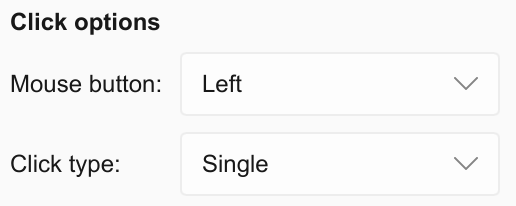
Under Click options:
- In the box beside Mouse button:, choose Left, Right or Middle.
- In the box beside Click type:, choose Single or Double.
How many clicks
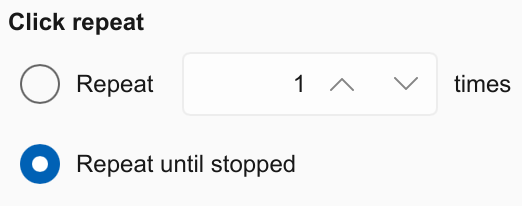
Under Click repeat, choose one:
- Repeat until stopped keeps clicking until you stop it.
- Repeat clicks a set number of times, from 1 to 9,999,999, then stops by itself. Enter the number in the box beside it.
With Double chosen, each double click counts as one. Whichever you choose, F6, or the shortcut you chose, stops it at any time.
Where it clicks
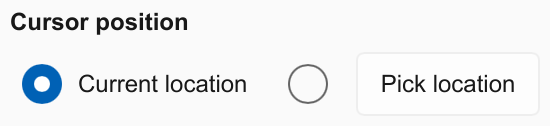
Under Cursor position, choose one:
- Current location clicks wherever your mouse pointer is. Move the pointer and the clicks follow it.
- Pick location clicks one spot on the screen every time.
To pick the spot:
- Press Pick location. The screen dims.
- Click the spot you want. To cancel, press Esc.
- Auto Clicker fills in X and Y with that spot and selects it for you.
The spot can be on any of your screens if you have more than one.
Auto Clicker never clicks its own window. While the pointer is over it, no clicks are sent, so keep the window away from where you want the clicks.
Uneven timing
Random offset + - makes the gaps between clicks slightly uneven instead of perfectly regular. It is optional.
- Tick the box beside Random offset + -, under the click interval.
- Enter a number of milliseconds in the box beside it.
Each gap between clicks is then made longer or shorter by a random amount, up to that number. For example, with a click interval of 1 second and a random offset of 40 milliseconds, each gap is somewhere between 0.96 and 1.04 seconds.

Uneven timing is not a way around a game's rules. Auto Clicker doesn't hide its clicks and can't protect an account.
Record and playback
Soon. Record and playback is not in the app yet.
Record and playback will let you do a series of clicks once. Auto Clicker will then repeat them in the same places with the same pauses.
In the window, the Record & Playback button is greyed out for now.

See Record and playback for how it will work.